Peer Reviewed: Togal.AI vs On-Screen Takeoff: A Comparative Analysis of Time Efficiency and Accuracy
Togal.AI vs On-Screen Takeoff: A Comparative Analysis of Time Efficiency and Accuracy
[1] Victoria V. Marulanda S., MS. ARCE (Corresponding Author),
[2] Brian Lines, PhD,
[3] Rebecca Kassa, PhD,
[4] Jake Smithwick, PhD,
[5] Kenneth Sullivan, PhD
[1] University of Kansas, email: victoriamarulanda99@gmail.com, victoriamarulandas@ku.edu
[2] University of Kansas, email: brianlines@ku.edu
[3] Simplar Foundation, email: rebecca.kassa@simplar.com
[4] University of North Carolina at Charlotte, email: Jake.Smithwick@charlotte.edu
[5] Arizona State University, email: Kenneth.Sullivan@asu.edu
ABSTRACT
Accurate estimation is critical in budgeting, scheduling, resource allocation, and bidding in construction projects. With the increasing adoption of digital tools, estimation software has become essential to enhancing productivity and precision, complementing professional expertise.
As generative AI enters professional practice, assessing its benefits in estimation is increasingly relevant. This study compares Togal.AI, a cloud-based estimation and takeoff tool with AI features, against the widely used On-Screen Takeoff. The research focuses on time efficiency and accuracy in quantity takeoffs performed by a first-time user on architectural floor plans, reviewing the potential for Human-AI collaboration through manual adjustments. Results show approximately 70% time savings using Togal.AI for takeoffs of general areas, linear elements, and item counts. Accuracy remained within a 5% margin compared to On-Screen Takeoff, with minimal discrepancies in smaller quantities. This study argues against concerns of eventual professional displacement, advocating instead for AI integration into the industry’s practice to enhance productivity and accuracy in combination with human judgment. Additionally, it highlights the need to introduce emerging technologies into academic curriculums and promote further testing to prepare future professionals, as the demonstrated efficiency gains suggest such tools could become standard practice in the industry.
INTRODUCTION
The estimation process is a crucial step in construction, involving a detailed review of a project to provide precise measurements and accurate pricing for each component and the associated labor, materials, and equipment. Estimation and Takeoff software programs have become the standard, and choosing one among the construction industry's variety of offers has focused on enhancing the efficiency and accuracy of internal processes for each company. Aiming to provide tools to excel in this process, and with the introduction of Generative AI models into academic and professional environments, this research provides a timely and relevant evaluation of the benefits and advantages that software with this integrated technology can provide, testing their accuracy and time savings against a program that is commonly used in the construction industry. Additionally, the potential of human-AI collaboration through available manual adjustments and available tools is also reviewed to provide insight into key aspects to be aware of when using this type of technology.
On-Screen Takeoff (v 3.98.14.04) and Togal.AI are the two estimation software used for this research. On-Screen Takeoff, marketed as “The Most Trusted Estimating Takeoff Solution Tool”, is an estimation tool that allows users to perform digital quantity takeoffs from construction drawings. This program enables the creation of digital representations of items being quantified using computer-assisted drawing tools for areas, linear elements, and count items. (On Center Software, 2025).
On the other hand, Togal.AI is a cloud-based estimation & takeoff tool with integrated AI that allows manual takeoffs and features AI tools that complement and enhance the efficiency of the traditional computer-assisted process, commonly done by other software. It is a fully online (Cloud-based) program allowing real-time updates and team collaboration. (Togal.AI, n.d.). This tool is designed to perform full quantity takeoffs of high-quality architectural floor plans, expedited by AI, which classifies and calculates construction areas, linear elements, and dimensions, as well as counts items. Takeoffs on other types of construction drawings, such as architectural elevations, can be performed using manual tools, and combining these with AI features enhances item search and pattern identification.
METHODOLOGY
As a first-time user of the two previously introduced estimation software programs, time was invested in learning how to operate and develop proficiency with each tool. Resources provided by academic instructors, along with articles and video tutorials, were used. Initial testing was conducted on both programs using architectural floor plans of reduced quality to explore their features and available tools.
The methodology of this research was designed to effectively compare the accuracy and time savings of quantity takeoffs performed with both software programs. It is acknowledged that a learning curve may have influenced the performance of this study, as drawing sets were initially reviewed in one program, and based on the obtained values, performance was measured in the second program. For this reason, a Control Case is included in the research to account for any potential advantages this sequence may have in demonstrating time reductions and accuracy.
An assumption made for this research is that the computer-assisted manual quantity takeoffs performed on On-Screen Takeoff are accurate, based on the author's expertise and academic background. Identified errors and adjustments made in Togal.AI are based on comparisons with the OST results. However, modifications were also performed to the OST outputs based on discrepancies observed while refining Togal.AI’s results. It is acknowledged that Togal.AI’s AI functionalities may offer improved accuracy in area detection compared to manual tracing and adjustments performed in OST.
It is important to note that this research was performed in March 2025. As previously mentioned, the version of On-Screen Takeoff used was 3.98.14.04, and Togal.AI was evaluated based on the features available at that time. The author recognizes that both tools continue to evolve, and some of the identified opportunities for improvement may have been addressed in recent updates.
a. Initial Testing
As mentioned above, initial testing was performed with scanned drawings from multiple disciplines to become familiar with the tools and features offered by both software programs.
i. Structural: Youth Center
The initial evaluation with Togal.AI was performed using a foundation floor plan for a Youth Center, which constituted a structural drawing. At the time this research was conducted, Togal.AI’s AI functionalities were limited to architectural drawings, which restricted the extent of work that could be carried out with this construction drawing.

Besides this, an AI-automated takeoff was performed to assess the capability of the AI tools and determine which outputs could serve as a starting point for calculating the quantities of isolated footings, the concrete volume (CY) based on footing dimensions, and the approximate net area of the concrete slab. Also, this initial takeoff allowed the identification of potential areas where the AI might present inconsistencies. Most of these issues were related to drawing type, drawing quality, and the AI’s difficulty distinguishing among various elements within the floor plan. From the results obtained, the net area classification was later used to calculate the area of the concrete slab.
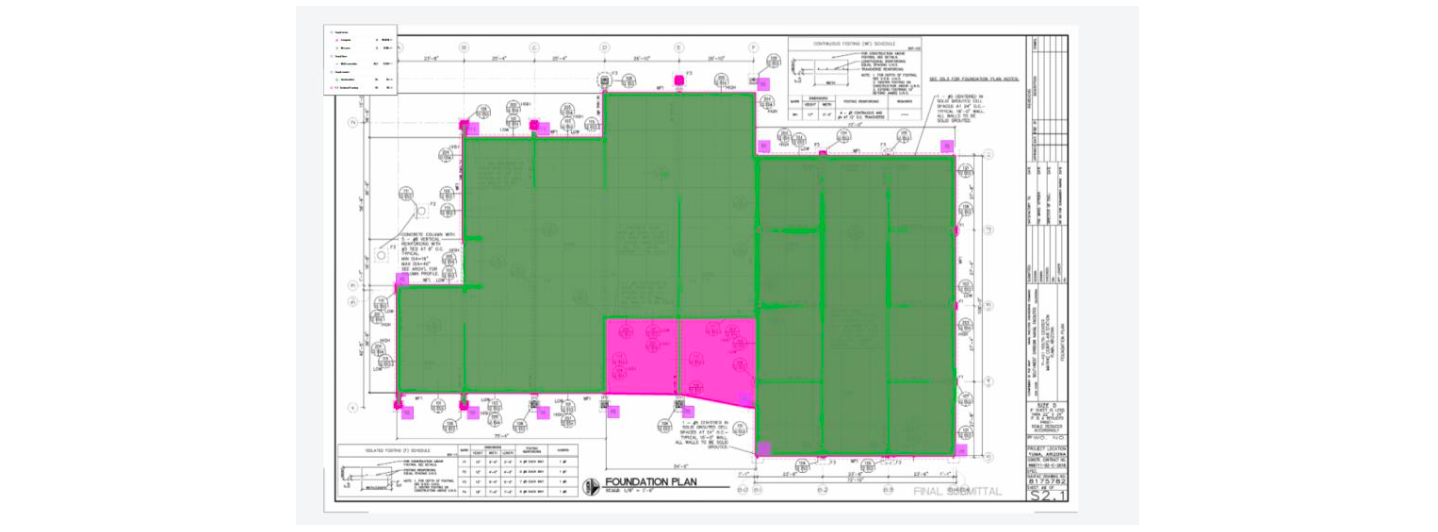
Additionally, with this floor plan, initial testing was conducted to evaluate how the AI Search Tool and computer-assisted area tracing performed in quantifying and calculating the area of the isolated footings (“F1”, "F2", "F3", and "F4 ").
ii. Masonry: Renovation Project
An initial comparison between the two software tools was conducted using architectural drawings for a kitchen renovation. The drawings were part of a 60% submittal and consisted of a scanned set that included handwritten notes and calculations.
In On-Screen Takeoff, the masonry wall perimeter was traced on the floor plan to obtain linear dimensions (ft) and area (sf) for this specific wall type. Separately, in Togal.AI, an AI- automated quantity takeoff was performed to compare and evaluate the AI-generated results.
Inconsistencies in the AI-generated quantities were identified, most of which were related to the inclusion of non-construction elements (dimension lines, arrows, notes) caused by multiple overlapping items and the overall drawing quality. The initial Togal.AI results excluded wall area quantities because no thickness was detected for those items. Additionally, the AI was unable to categorize wall types, which was necessary to obtain linear dimensions (ft) and area (sf), specifically for the masonry walls.

Adjustments were subsequently made to the AI-generated quantity takeoff using Togal.AI’s manual tools, such as Ungroup, Delete, and Split, to correct the traces. Due to the number of inconsistencies and the presence of notation and symbols in the floor plan, the quantities produced by the two programs differed significantly.
iii. Wood: Single Family Home
Finally, during this initial stage, using drawings of lower quality than those applied in the following sections, an attempt was made to perform a takeoff for the wood elements in the walls and ceiling of a single-family home using Togal AI.
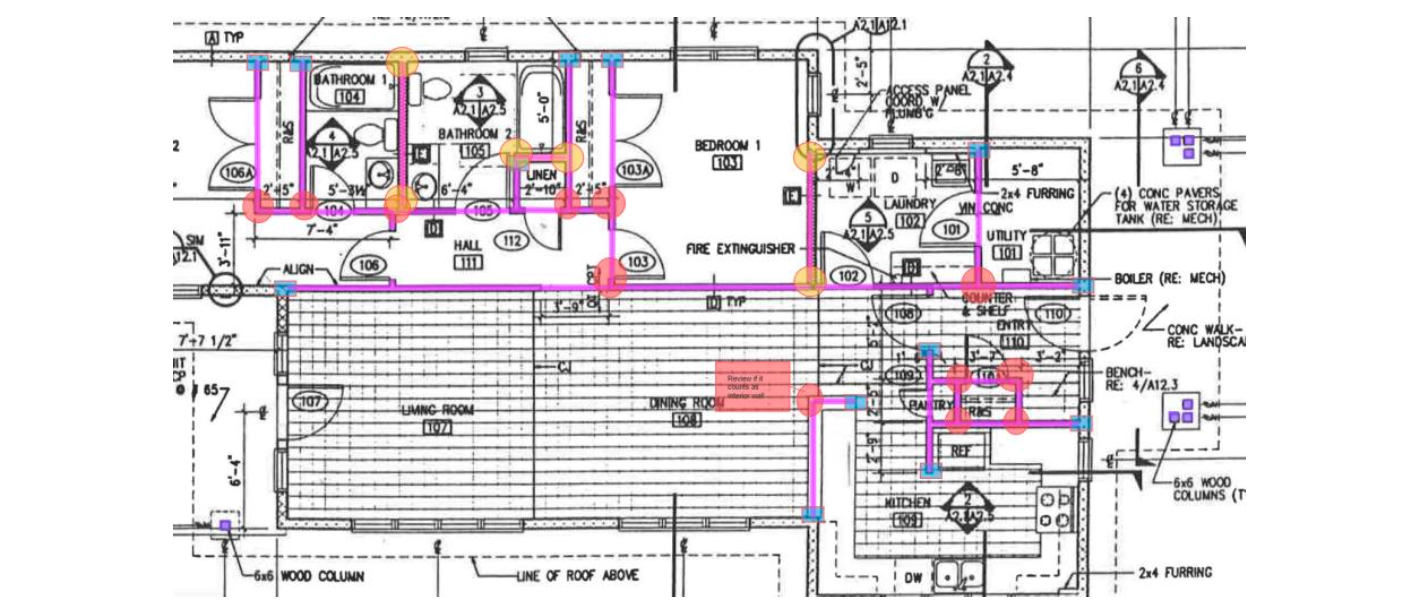
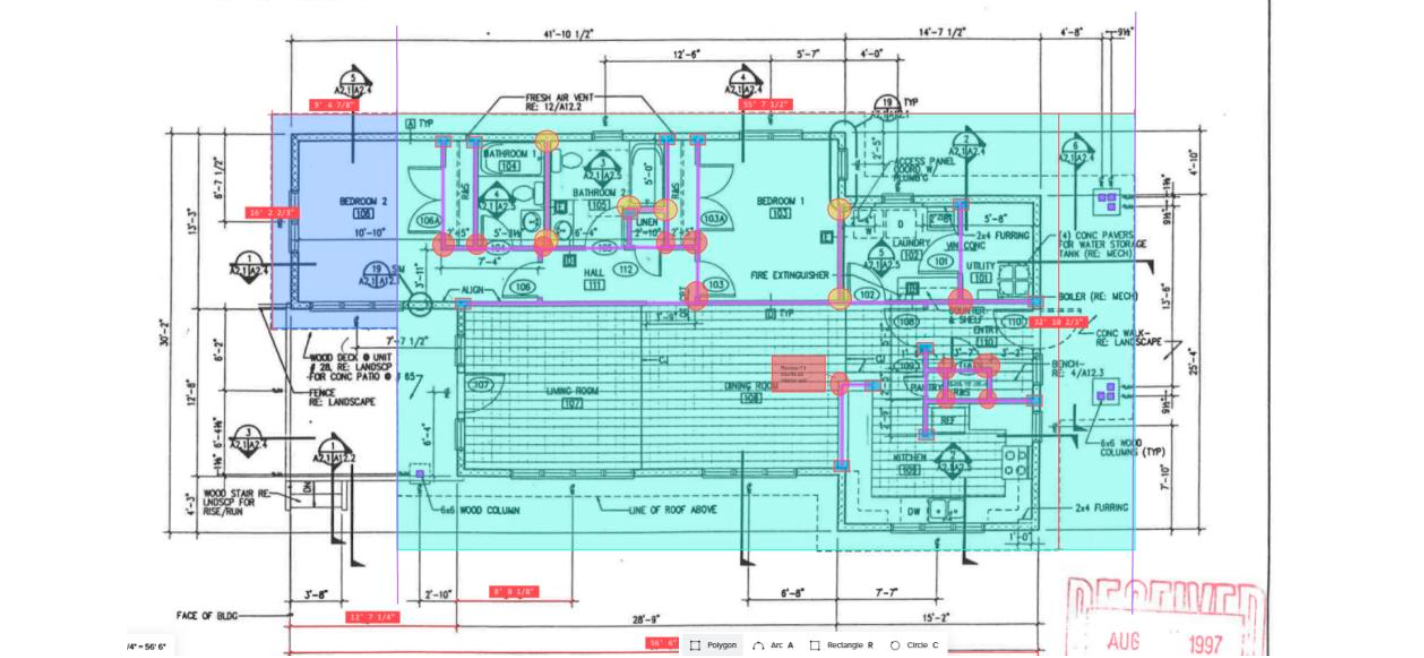
Once again, due to the quality of the drawings, the software was unable to automatically set the scale, and when attempting the AI-automated quantity takeoff, the obtained results were inaccurate with multiple tracing inconsistencies. Because of this, it was determined that this section would instead be used to test the manual tools available in Togal.AI, specifically tracing interior wall perimeters with linear classifications for two wall types (plumbing and standard wall), counting exterior 6x6 columns with count classifications, and calculating square footage of sheathing using area classifications.
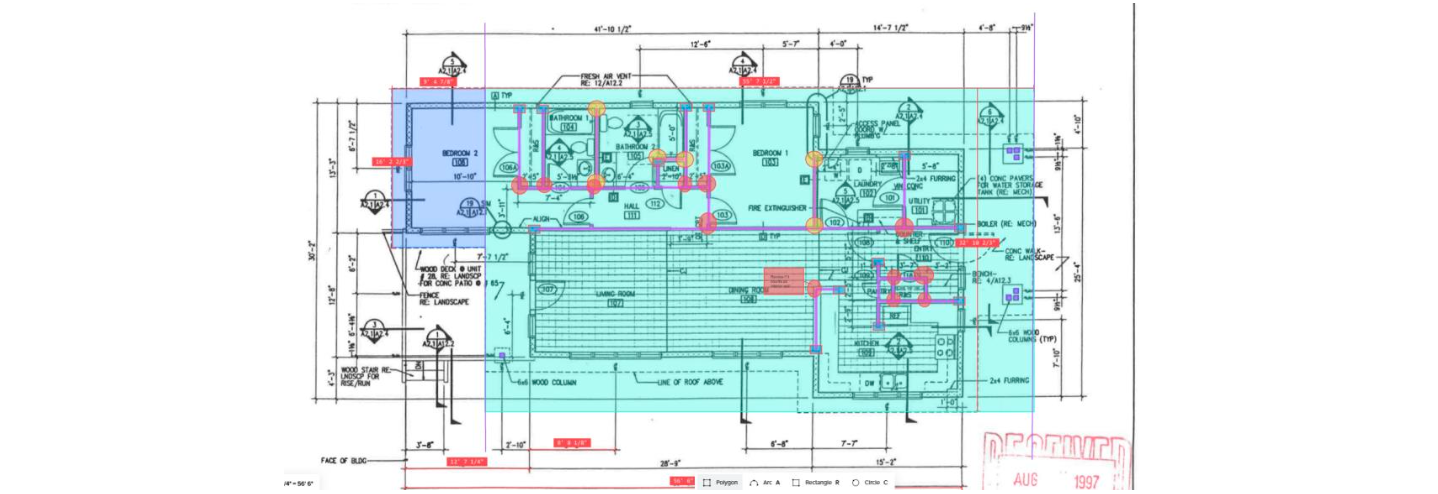
This exercise provided a deeper understanding of the manual features offered by Togal.AI in addition to its AI-driven tools. It demonstrated how comparable these features are to the standard ones provided by On-Screen Takeoff.
b. Case Study I: Fire Station
Two architectural floor plans of a two-story fire station were selected to compare time efficiency and accuracy between the estimation software programs. An initial AI-automated quantity takeoff was performed using Togal.AI to obtain raw quantities for general areas (SF), linear elements (LF), and count items (each, EA) in predefined classifications. The time taken by the AI to generate the quantity takeoffs for each floor plan was recorded, and the results were reviewed to identify inaccuracies in the calculated items and their value.
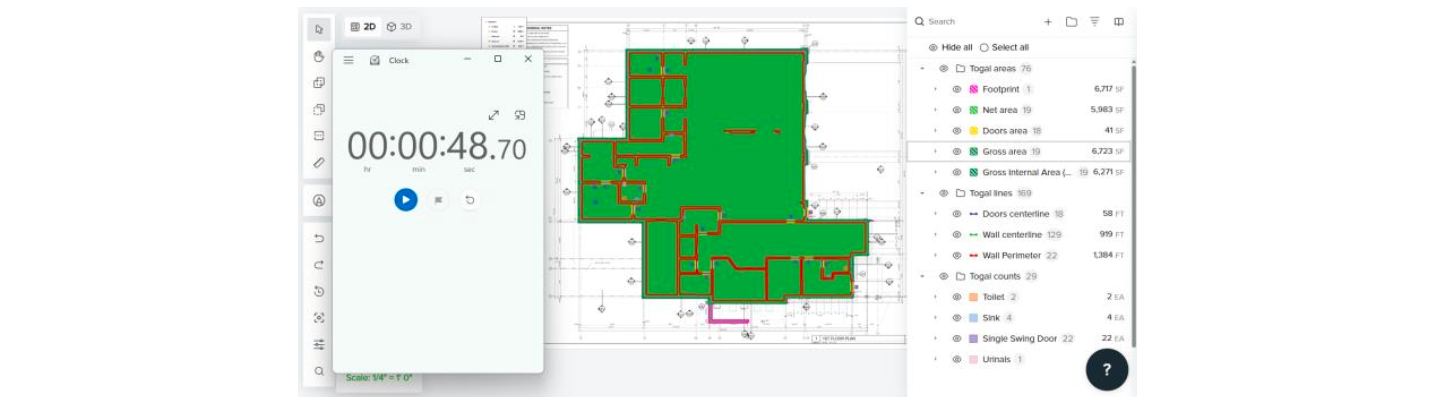
Based on the classifications obtained from Togal.AI, computer-assisted manual quantity takeoffs were then conducted for each category using On-Screen Takeoff, recording completion times. A comparison was made between the results from both tools, and the percentage differences between them were calculated.
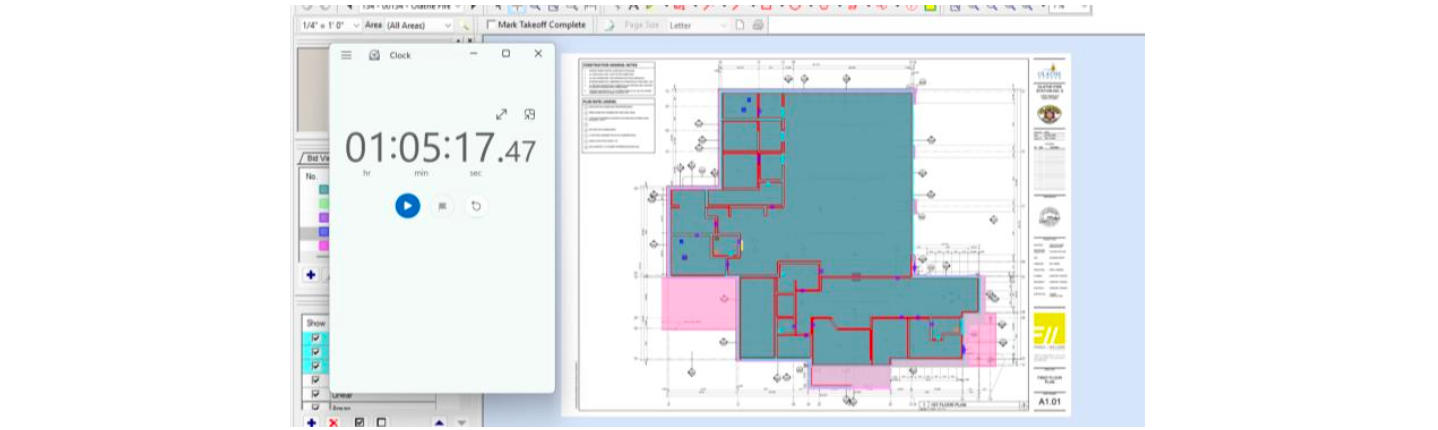
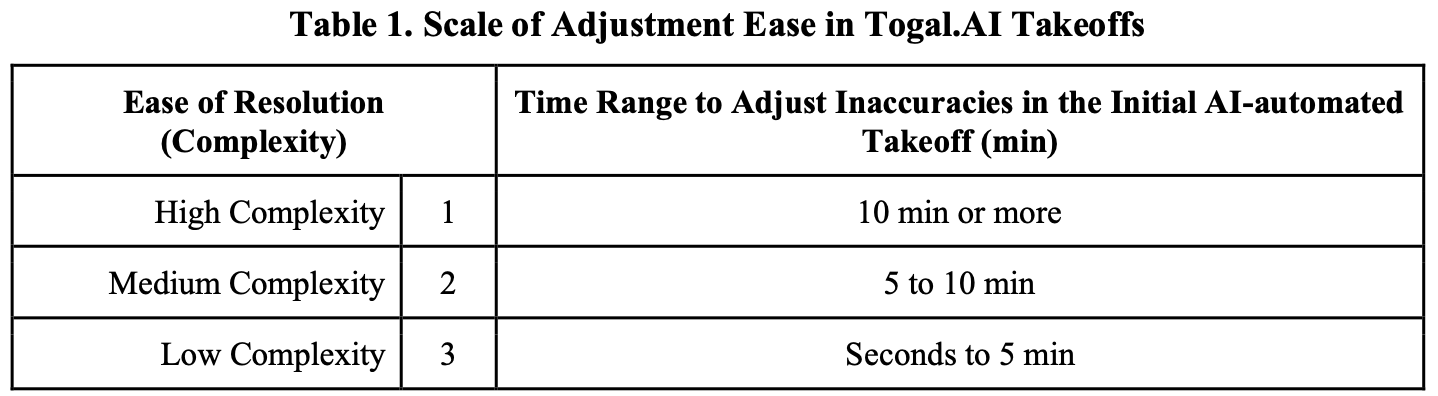
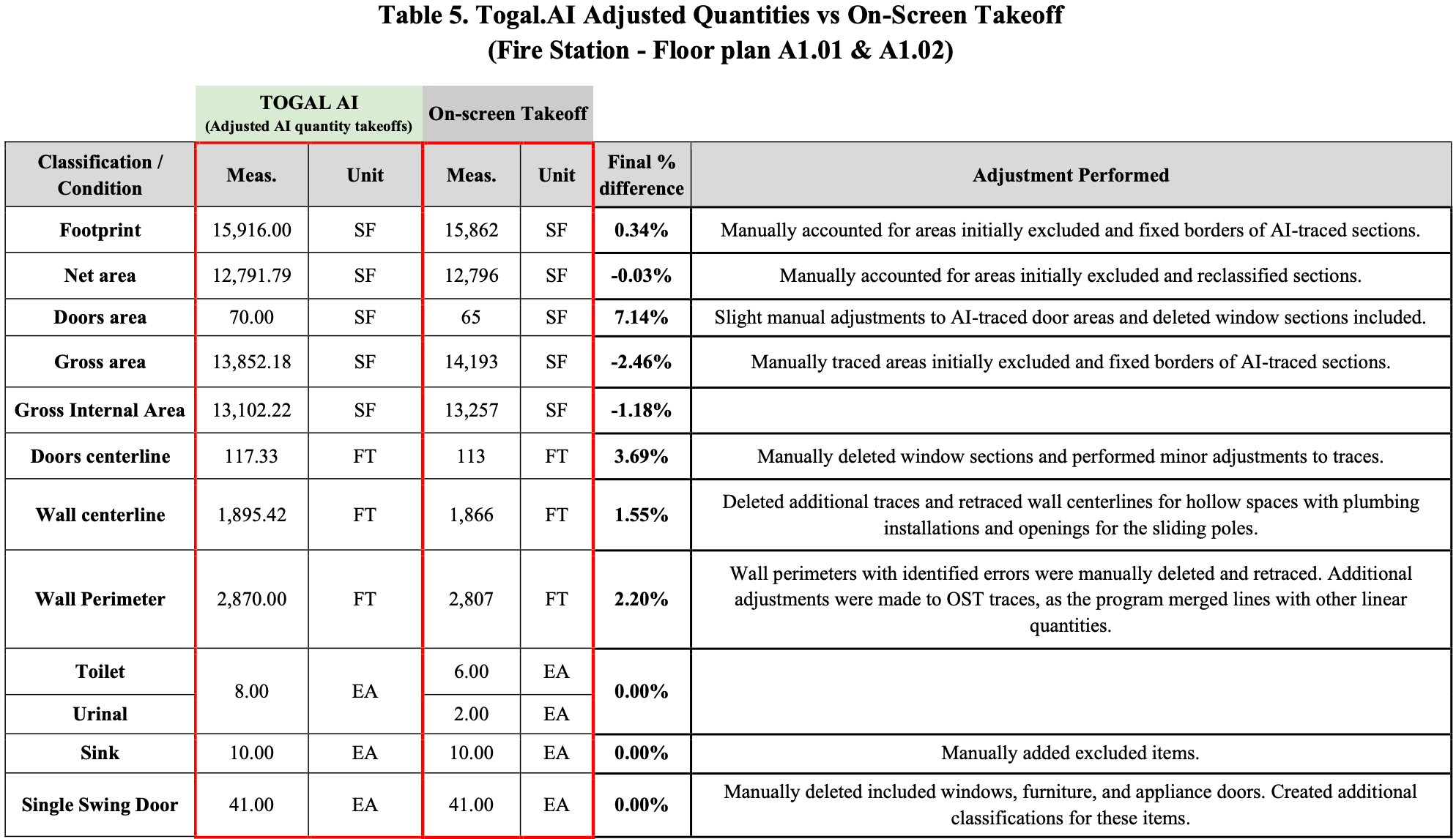
Following the identification of inaccuracies in Togal.AI’s takeoffs and the differences compared to values from On-Screen Takeoff, adjustments were made using the manual tool available in Togal.AI’s functionality. The time required for these corrections was recorded. Corrections were performed to quantities with a percentage difference at or above 5%, and the ease of resolution was classified according to the scale shown in Table 1.
Finally, a comparison between the total time spent using each program was conducted to determine time savings, and a percentage difference based on the adjusted values from Togal.AI was calculated to assess accuracy.
c. Case Study II: Multistory Hotel
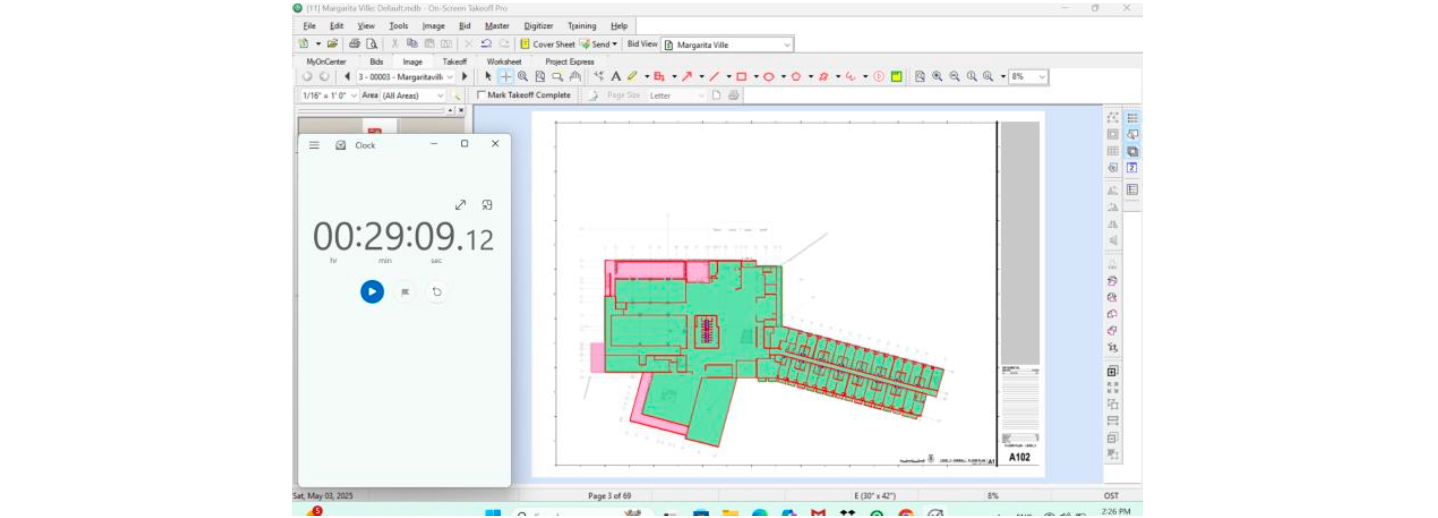
Following the same methodology used for the Fire Station, an analysis was conducted comparing On-Screen Takeoff and Togal.AI on two architectural floor plans for a multistory hotel. This case study provides additional testing of accuracy and efficiency using a second set of clear drawings.
Time to perform takeoffs (AI-generated with adjustments and manual using computer- assisted tools) was recorded. For this case, only key quantities were evaluated: building footprint, gross internal area, wall centerlines, and counts of toilets and single-swing doors. Results were analyzed to identify Togal.AI inconsistencies and perform the necessary adjustments, which were classified by ease of resolution (Table 1). Percentage differences for each quantity between the two tools were also calculated, and overall time savings were determined.

d. Control Case: Reflective Ceiling Floorplan, Fuel Farm Building
This research acknowledges that going back and forth between estimation software programs to assess accuracy and time savings could introduce bias, as experience and skills may improve over multiple iterations and testing, potentially favoring one tool over the other. To address this, a control case was included to evaluate time savings in quantity takeoffs on a reflective ceiling floor plan (RCP), comparing a combination of AI and manual tools in Togal.AI against computer-assisted manual procedures in On-Screen Takeoff.
The objective for this type of construction drawing was to obtain the area quantities (SF) and count items (EA) for the different ceiling materials, including suspended and gypsum ceilings, a metal soffit system, and multiple lighting fixtures. According to Togal.AI’s resource page, the AI features also work on this type of construction drawing. For this control case, manual quantity takeoffs were performed and time on On-Screen Takeoff, creating conditions and layers for the ceiling materials and items specified in the drawing.
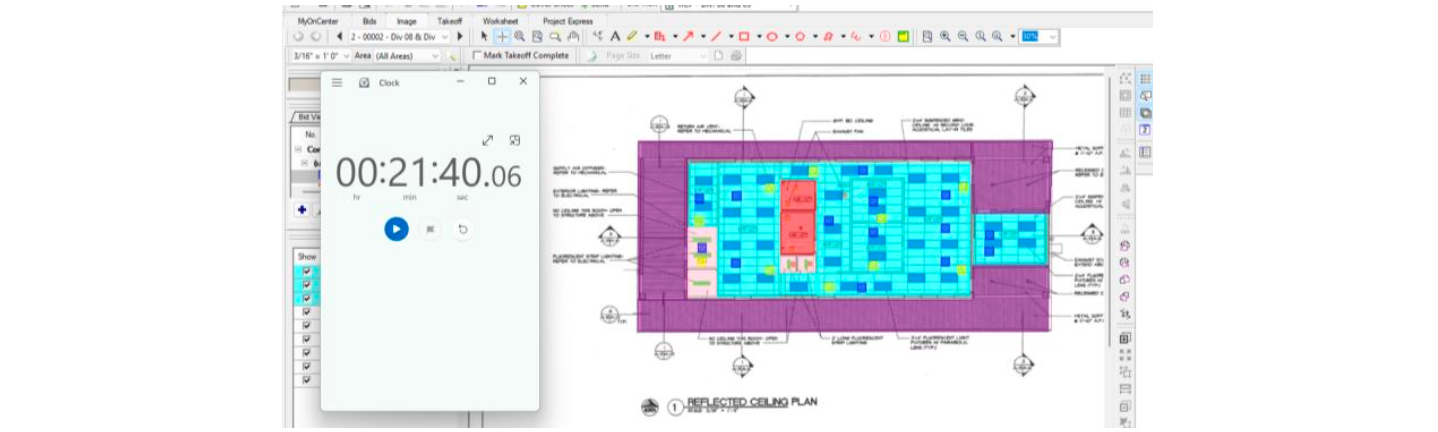
Separately, an initial AI-automated quantity takeoff was performed and timed using Togal.AI to review the quantities generated by the software. However, the tool did not differentiate between the various ceiling materials, types, or elements specified in the drawing. Only predefined classifications for area (footprint, net, and gross area) and linear elements (wall centerline and perimeter) were calculated for the RCP.
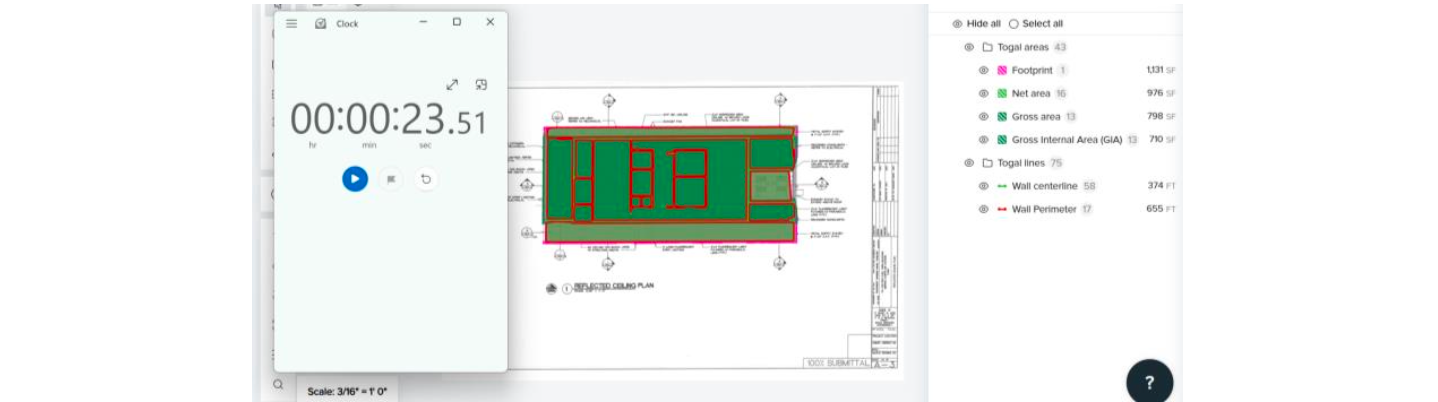
Using the AI-calculated “Gross Internal Area” quantity, separated by AI-identified spaces and rooms of the floor plan, additional efforts were made and timed to capture the duration spent on materials categorization, tracing adjustments, and the inclusion or exclusion of areas using manual and AI tools (Search Tool) offered by Togal AI.
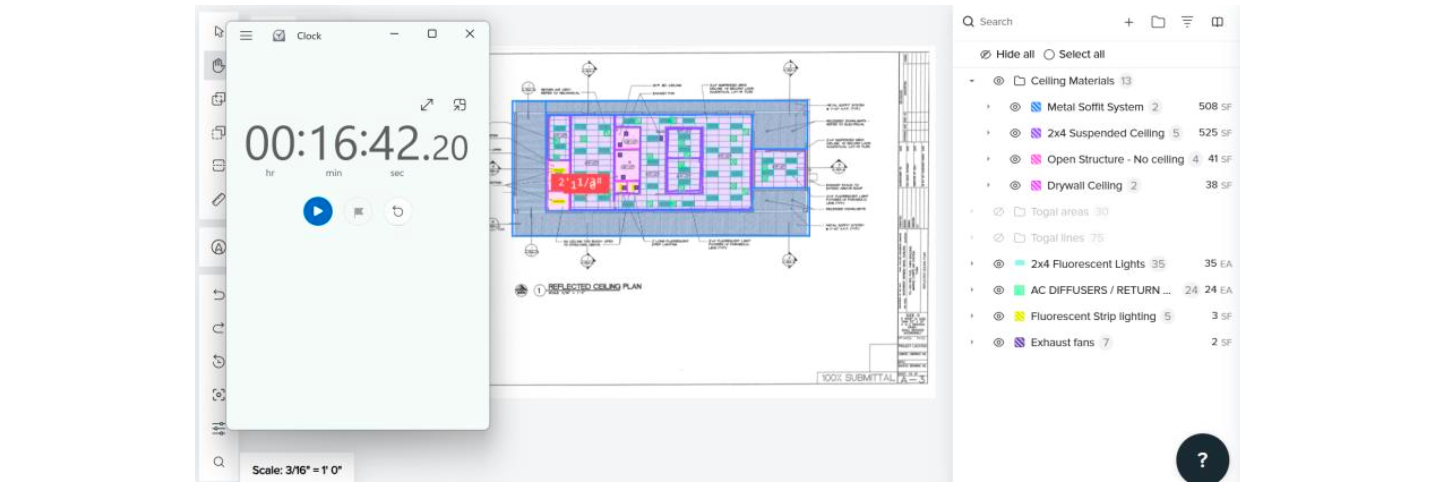
A comparison of the time spent using both programs was conducted to calculate time savings and evaluate the accuracy of each tool’s results.
RESULTS
a. Initial Testing
As the initial testing with drawings of multiple construction disciplines was done to get familiar and comfortable with both tools, working around standard takeoff practices and estimation in construction, there are no results to be reviewed for the analysis of accuracy and efficiency between the two tools. However, this section allowed the author to identify the advantages of AI features in these processes, along with the areas in which these presented inconsistencies that needed to be flagged for further analysis.
For additional material and snapshots of the initial testing stage, please refer to Appendix 1 - Section 1.
b. Case Study: Fire Station
Table 2 presents the total time consumption for both floor plans in each software program, including initial AI-automated quantity takeoff (raw quantities) and posterior adjustments. Additionally, the overall time saving is presented for this case study.
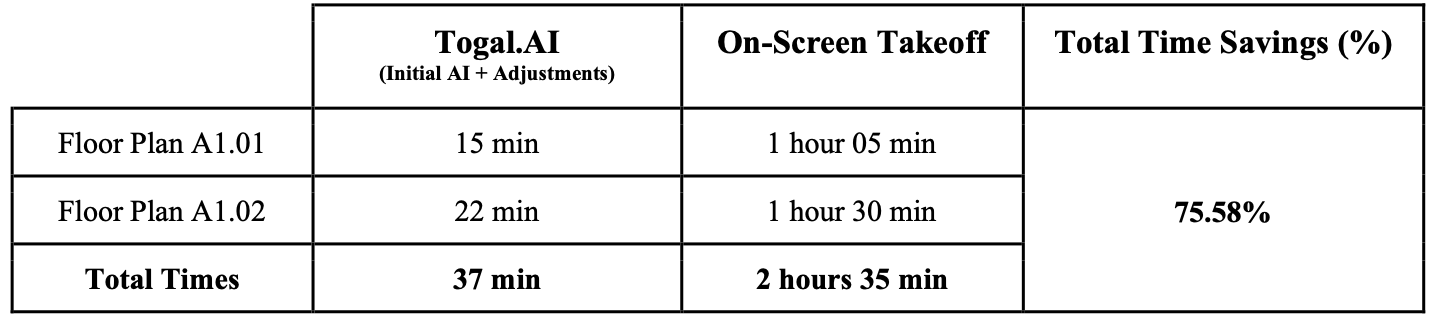
The individual results for floor plans A1.01 and A1.02 support the previously shown time savings. These are presented in Tables 3 and 4, which compare the initial AI-automated takeoff quantities (raw quantities) against the values from On-Screen takeoff. Explanations for each percentage difference are provided, based on inaccuracies and errors identified in the AI results. The main inconsistencies shown in the AI-automated takeoff include excluding projections for roofs, upper floors, and foundation systems; as well as tracing errors, caused by annotation arrows, textures, hollow areas, corners, and installations shown in sections of the drawings. Additionally, the distinction between items such as doors, furniture, windows, or other appliances was not consistent. For visuals on the previously mentioned inconsistencies, please refer to Appendix 1 - Section 2.
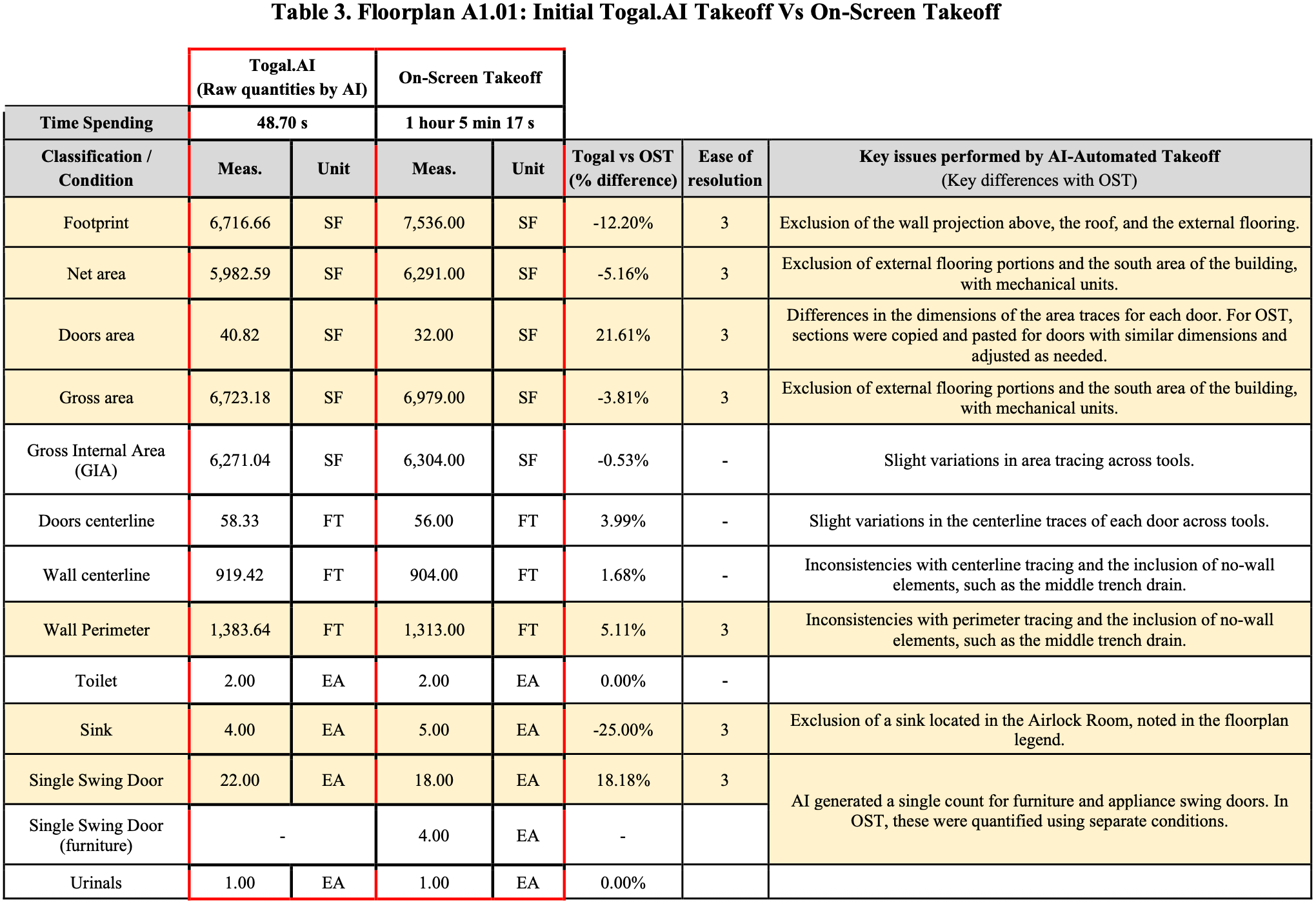
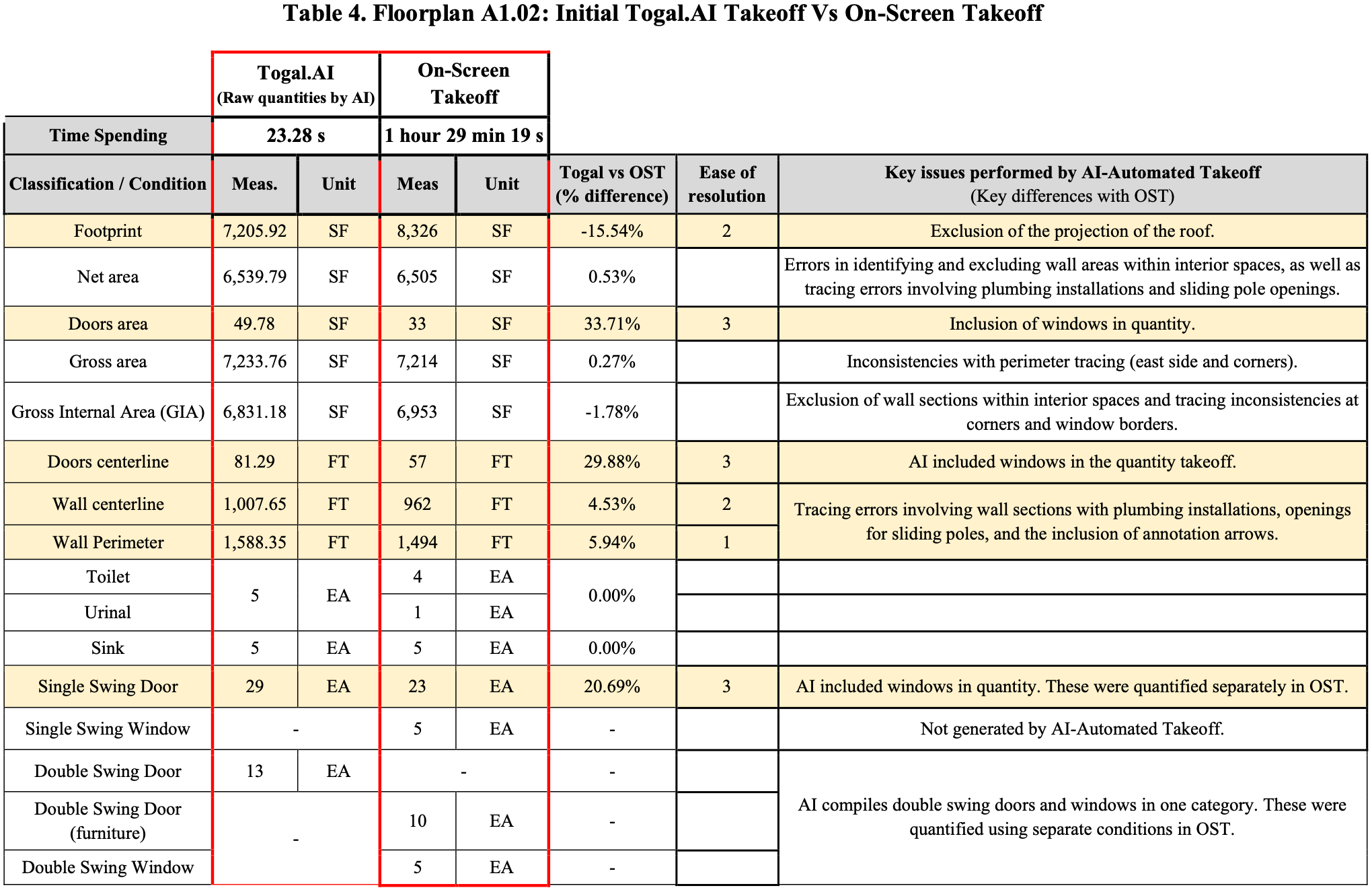
Finally, Table 5 summarizes the final comparison between the adjusted quantity takeoffs in Togal.AI and On-Screen Takeoff, where the accuracy between measurements is represented by the percentage difference. Higher percentage differences were observed for smaller quantities; however, the unit differences remained minimal. Additional adjustments were also performed On-Screen Takeoff based on discrepancies noticed while adjusting Togal AI results, recognizing that AI features were more accurate in the reference item.
c. Case Study: Multistory Hotel
Table 6 presents the total time required for both floor plans in each software program, including the initial AI-automated quantity takeoff (raw quantities) and subsequent adjustments, as well as the additional time spent making corrections in On-Screen Takeoff based on discrepancies identified while adjusting the Togal.AI results. The overall time savings for this case study are also presented.
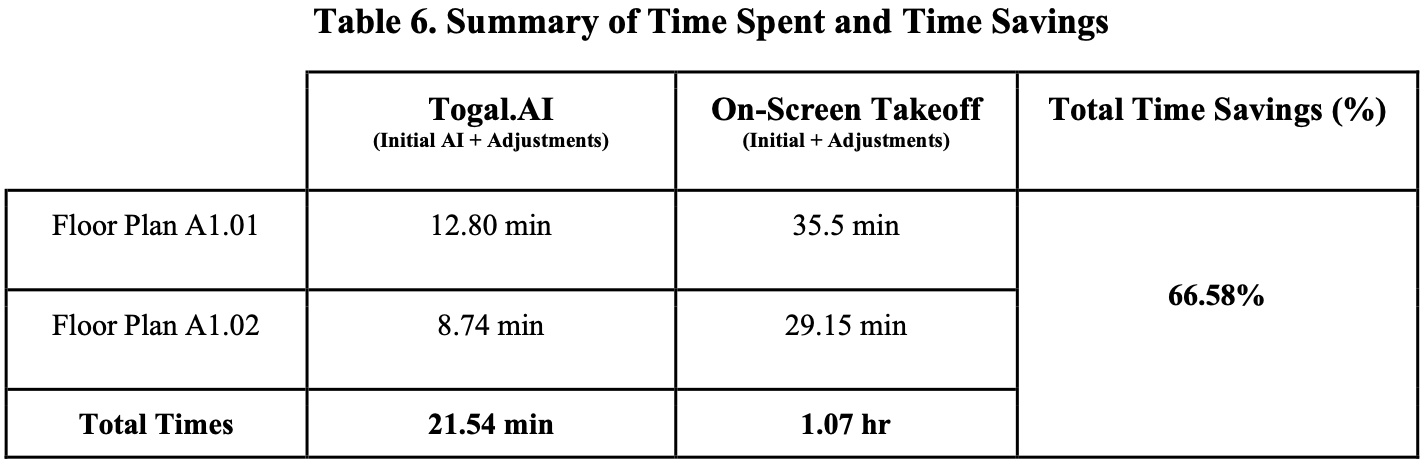
The total time savings shown above are supported by the individual time spent on the specific quantities (area, linear, and count classifications) evaluated for the multistory hotel. Refer to Appendix 1 - Section II (Case Study II) for detailed tables per floor plan (Tables A to D), similar to what was presented for the Fire Station Case. Additionally, visuals of the identified inconsistencies for this Case are included in the appendix.
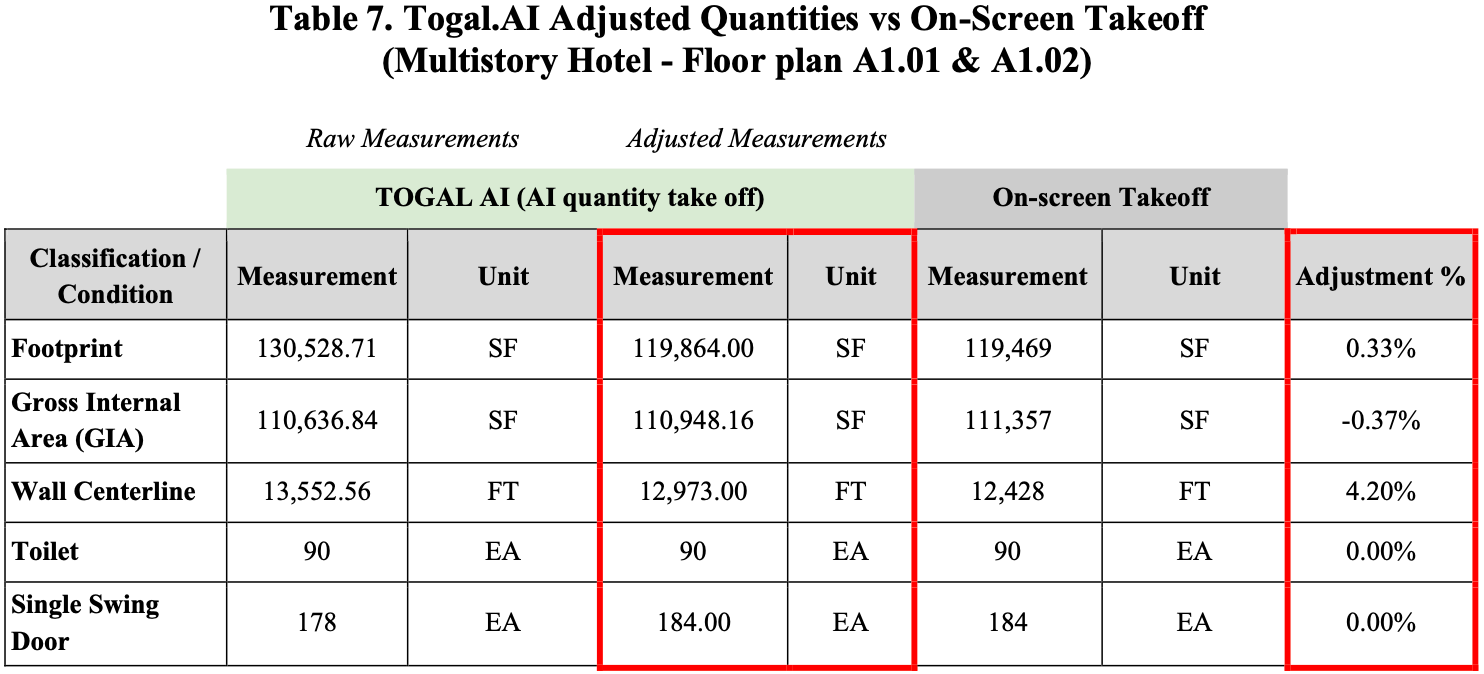
Table 7 summarizes the final comparison with the percentage difference for the two architectural floor plans, including the initial raw quantities and adjustments made in Togal.AI, as well as the takeoffs performed in On-Screen Takeoff.
d. Control Case: Reflective Ceiling Plan, Fuel Farm Building
The results obtained for the Control Case in its RCP are shown in Table 8.
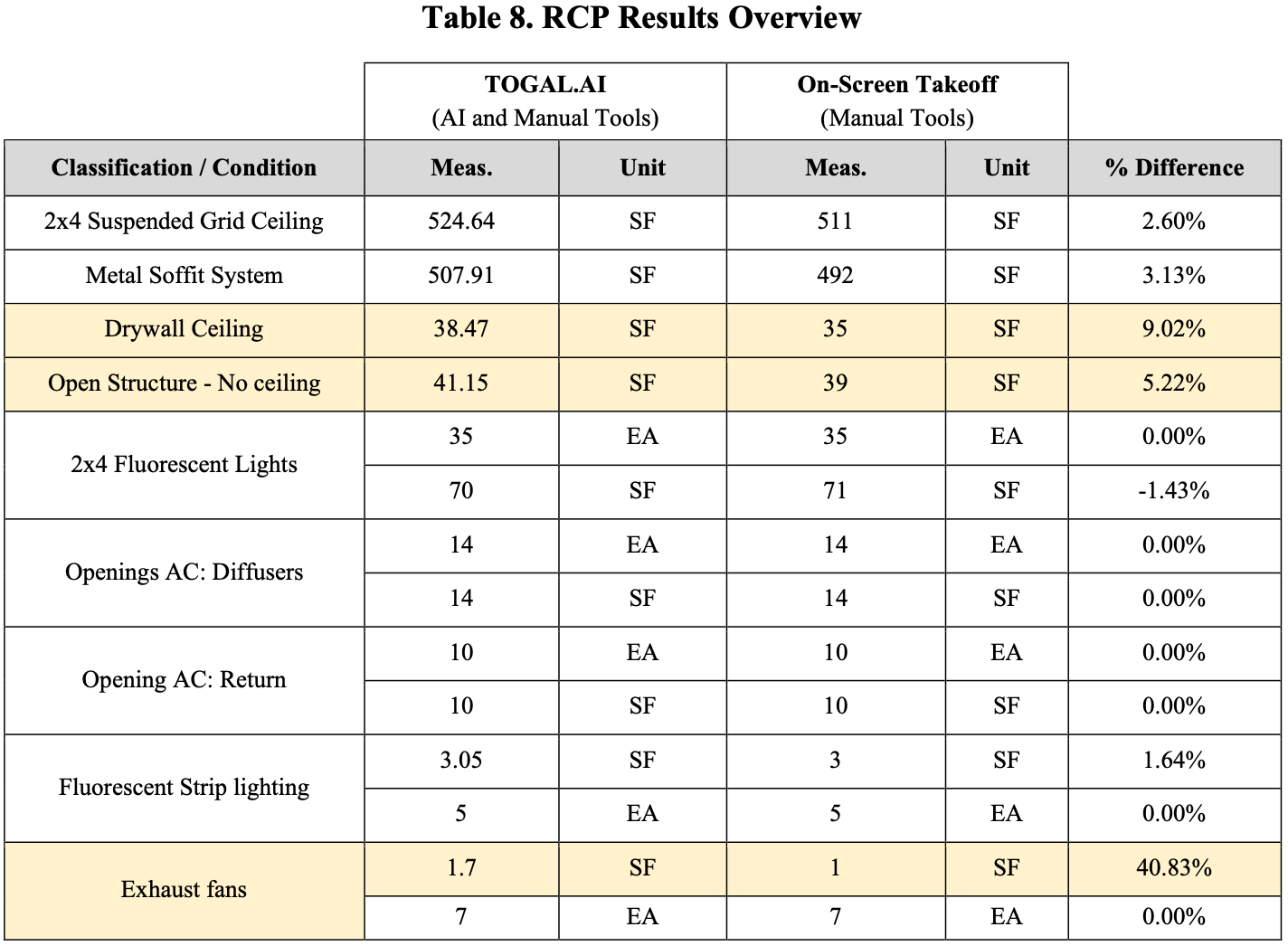
The percentage difference between the measurements obtained by each software program remained minimal. For the highlighted classifications with a higher percentage difference, which result from minor discrepancies in the area tracing, this method is misleading, as minor absolute differences can produce disproportionately large percentages. However, these values are included in the analysis to be considered for the overall time savings between tools presented in Table 9.
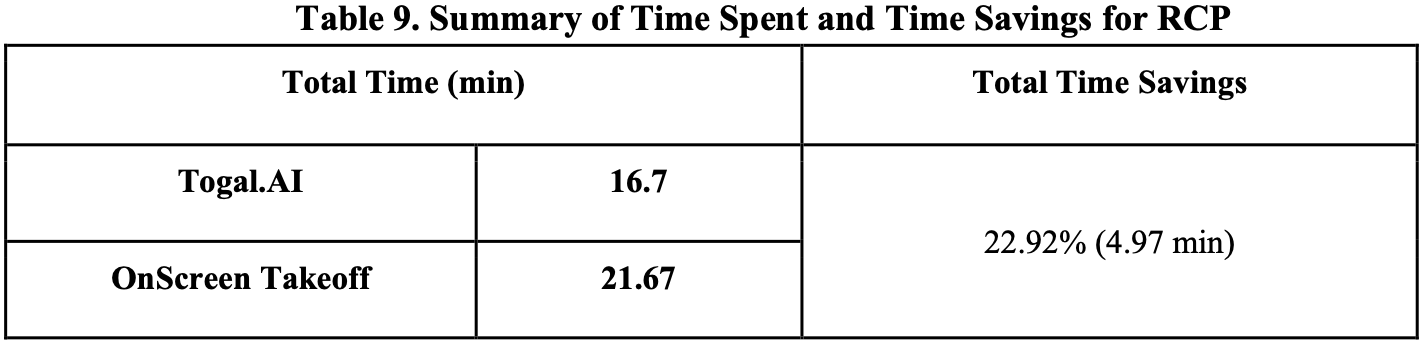
Most of the work for this Control Case was done manually in both software programs, as the AI-automated quantity takeoff in Togal.AI isn’t optimized to meet the scope for this scenario. As the procedure performed on both tools was similar, with minor advantages of Togal’s AI tools, the time savings for this specific case may be attributable to efficiencies gained through the learning curve of performing repetitive work. This exemplifies that the iterative process between tools has an impact on time savings. However, the values obtained for the Firestation Case go beyond what could be linked to this issue.
DISCUSSION
The average time savings of approximately 71% (71.03%) shown across the two main Case Studies (Fire Station and Multi Story Hotel) when using Togal.AI can be attributed to the acceleration provided by AI features. Measurement accuracy, represented by the percentage difference between values obtained in each program, was reduced to below 5% for almost all of the classifications with manual adjustments. For quantities reporting a value above 5%, the unit difference remained minimal.
AI-assisted tools, such as area and linear tracing by spaces, item counting, automatic scale detection, merge, subtract, and search functions, significantly reduce the time required to perform quantity takeoffs in architectural floor plans. The program offers notable uniformity and accuracy in traces related to area quantities, particularly for door sections, minimizing human error that might otherwise occur with computer-assisted manual traces in On-Screen Takeoff. Additionally, Togal.AI’s ability to provide quantities and measurements per room is extremely useful when individual breakdowns are required. Replicating this with On-Screen Takeoff would require additional time to individually group rooms and present quantities per area. In this study, continuous traces were used for the floor plans to maintain consistent time tracking on OST.
However, it is important to highlight that relying solely on the AI-automated results is not advisable. As shown by this research, by the time the study was performed, the AI features lacked accuracy when used in drawings of lower quality (scanned documents), as identified in the initial testing section. Even with high-quality drawings, Togal.AI may omit significant areas, such as upper and lower projections, due to inconsistencies in pattern recognition, confusion with hollow spaces, annotation lines, corners, and installations. Furthermore, the program is unable to include additional items specified in legends or plan notes.
A tendency observed during this study was an inclination to trust the AI results, due to their accuracy and quick results turnaround. In multiple instances, while performing adjustments in Togal.AI, additional corrections were made to the takeoff performed on On-Screen Takeoff, as the automated process seem to be more accurate on tracing exercises. However, this is just another indication that even as the AI-automed process seems to efficient and convenient, it is crucial to rely on human judgment and expertise. It is the the professionals’ responsibility as to ensure that results are as accurate as possible, and AI is just another tool to enhance efficiency and minimize the room for human error.
Currently, the predefined classifications that Togal.AI calculates with the AI-automated quantity takeoff serve as a starting point for further estimations, as shown in the Structural Set and Control Case of this study. While time savings in the Reflective Ceiling Plan were attributable to the learning curve and not specifically to any AI features, it is an example of potential collaboration between AI and manual tools. Togal.AI features almost the exact tools as On-Screen takeoff, with the addition of AI tools that have proven to enhance efficiency and accelerate tedious procedures. In this case, the choice of an estimation software will ultimately depend on user preference regarding the tools offered.
CONCLUSION
This research demonstrates that Togal.AI enables substantial time savings while still allowing manual adjustments using tools similar to those available in On-Screen Takeoff. The integration with AI tools further enhances efficiency and accuracy in the estimation process. Regardless, professional expertise and human oversight remain essential when employing these tools. Continuous review and adjustments, ideally by multiple individuals, should be standard practice before fully relying on AI-generated results.
As AI models and estimation software continue to evolve, improving through user interactions, it is imperative to foster a deeper understanding of these technologies and to prepare future professionals for their ethical and proficient use. This research highlights the value of human-AI collaboration, proving its potential impact on efficiency and productivity, which are critical in the construction industry. These tools should be used as valuable assistants to complement and expedite processes while minimizing human error.
Further testing is recommended, as the author acknowledges that the study's scope and single- user involvement may influence the results, as evidenced by the control case. Additional research involving various types of high-quality construction drawings and multiple users is highly encouraged to capture various perspectives. Future efforts should also evaluate features released by recent On-Screen Takeoff updates to assess the long-term impact of AI integration on accuracy, efficiency, and the evolution of standard estimation procedures.
REFERENCES
On Center Software (2025) On-Screen Takeoff (R) The Most Trusted Estimating Takeoff Solution. https://www.oncenter.com/products/on-screen-takeoff/
Togal.AI. (2025) Help Center. https://help.togal.ai/
APPENDIX 1.
Togal.AI vs On-Screen Takeoff:
A Comparative Analysis of Time Efficiency and Accuracy
SECTION I. INITIAL TESTING
Disclaimer: For this case, the time spent on both programs was not measured. It was used as an introduction to both software, reviewing TOGAL’s AI assistant capacity and manual features, and comparing them to the manual procedure and quantities done in OST.
Testing notes:
The AI-Automated takeoff on Togal AI is limited to architectural drawings.
However, with the AI-assisted takeoff automatization, Togal was able to:
Identified the approximate net area for the concrete slab.
Merged portions of the tie beam areas that were excluded by the AI with the manual tools.

Manually deleted external areas captured by the AI (Area in pink).
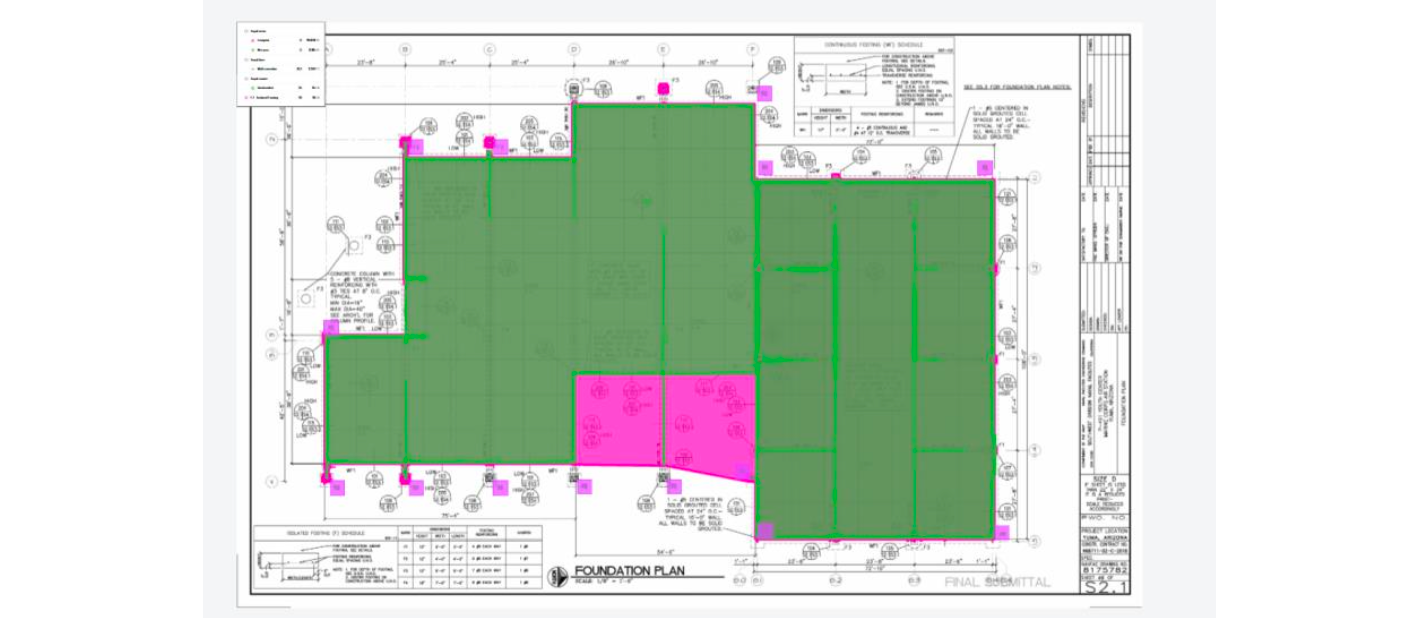
Testing Notes - Combining Togal.AI features with “manual” Tools:
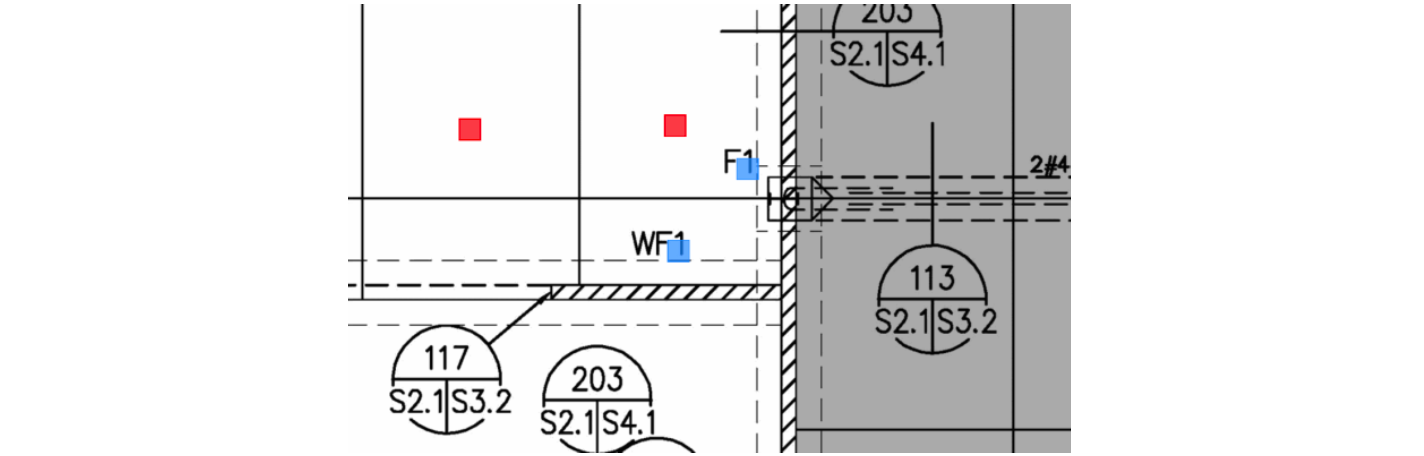
Obtained a count quantity of “F1, “F2”, “F3,” and “F4” isolated foundations with the search AI tool. The text option was used to search for specific text (“F#”), as the program was unable to filter based on the drawing specs.
F1: deleted the unmatched finds that AI picked up, such as “WF1”.
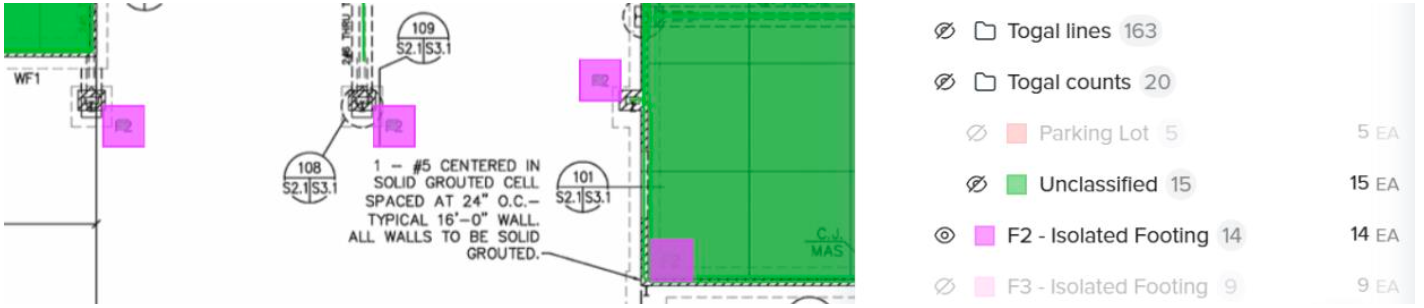
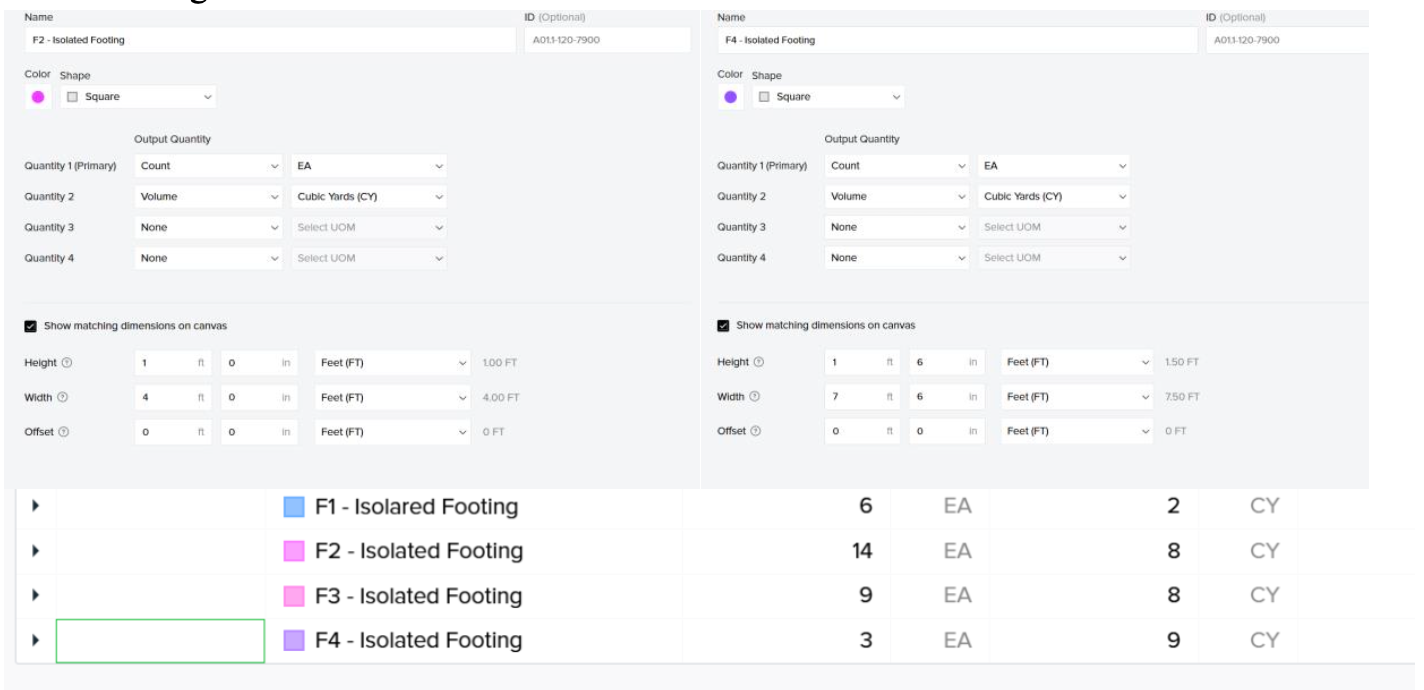
Volume (CY) was calculated based on manually set dimensions in the classification settings.
2. Masonry Case Study: Renovation Project
Procedure Overview for the Takeoff performed with Onscreen Take Off
Manually traced the masonry wall perimeter on drawings to obtain linear dimensions (feet) and area (sft).
Assumptions:
No deductions were performed for openings, as all of them were less than 100 sqft. Complete traces in the floor plan, if deductions are required, must be done manually with the drawing specs.
Manually fixed/set scales (based on written annotations) to perform sketches.
Procedure Overview for the Takeoff performed with Togal AI
Due to the quality of the drawings, the AI was not able to identify the scale from the drawings (two scales on the drawing: printed and annotation)
The scale was set manually, according to hand annotations.
From Drawing A1 - Plan Floor, the AI-assisted takeoff presented the following quantities for the whole project (including the cafeteria):

Observations from the AI-automated takeoff:
The area of the walls was not provided from this drawing, as the thickness of these items was not identified by the AI; only the wall centerline and perimeters (linear measurements) were provided.
Some openings (access from the entrance area) were deducted from linear measurements.
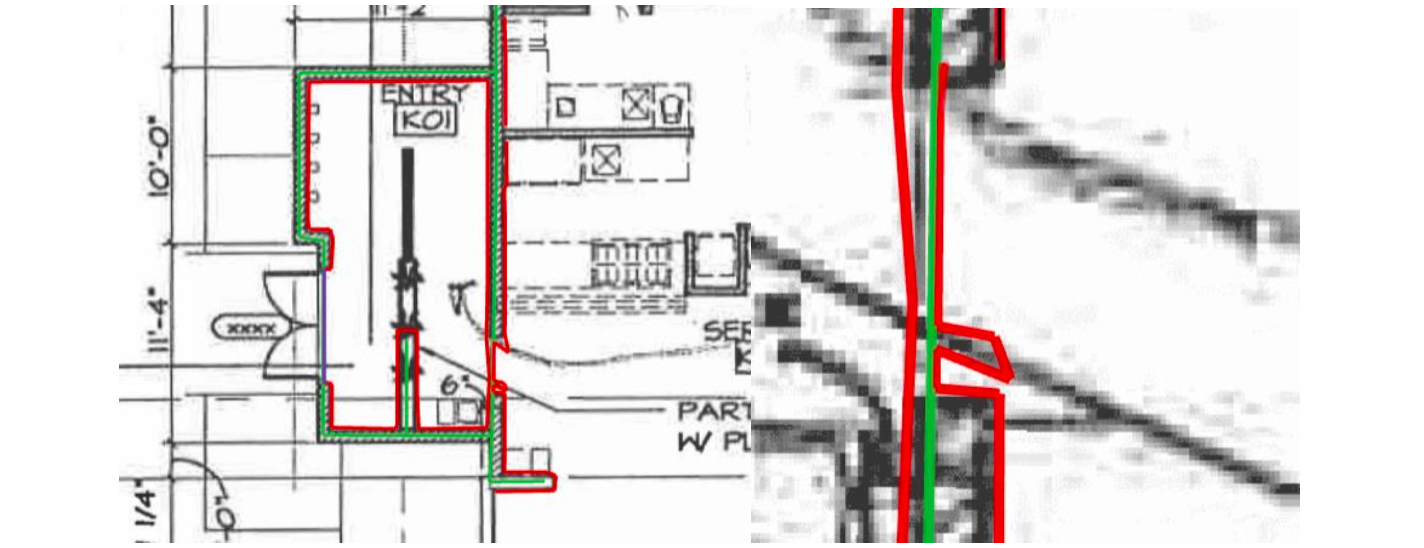
Due to the quality of the drawings, some annotations were assumed as wall portions by AI. By deleting them and retracing this linear category, one can fix this issue.
Manually cleaned with the ungroup and split tools, the AI-generated quantities to kept only the ones required by the assignment. (North, west, and east walls).
AI-automated quantity takeoff groups all walls in one category. No difference is provided between the types of walls, based on height, as requested in the assignments.
Values obtained (linear feet) significantly differ from those obtained in OST.
3. Wood Case Study: Single Family Home
Testing notes (Togal AI):
The program presented issues in identifying the scale according to the scale bar, set manually with known dimensions.
No AI automated take-off was performed in this set of drawings:
Manually traced interior wall perimeters with a linear classification:
Define two types of walls: plumbing wall and typical wall.
Manually counted the exterior 6x6 columns with a count classification.
SECTION II. RESULTS
1. Case Study I: Fire Station
Key Inconsistencies of the AI-automated Quantity Takeoff
Exclusion of top floor projections, footing, and slab projections (dashed line) for the footprint item.
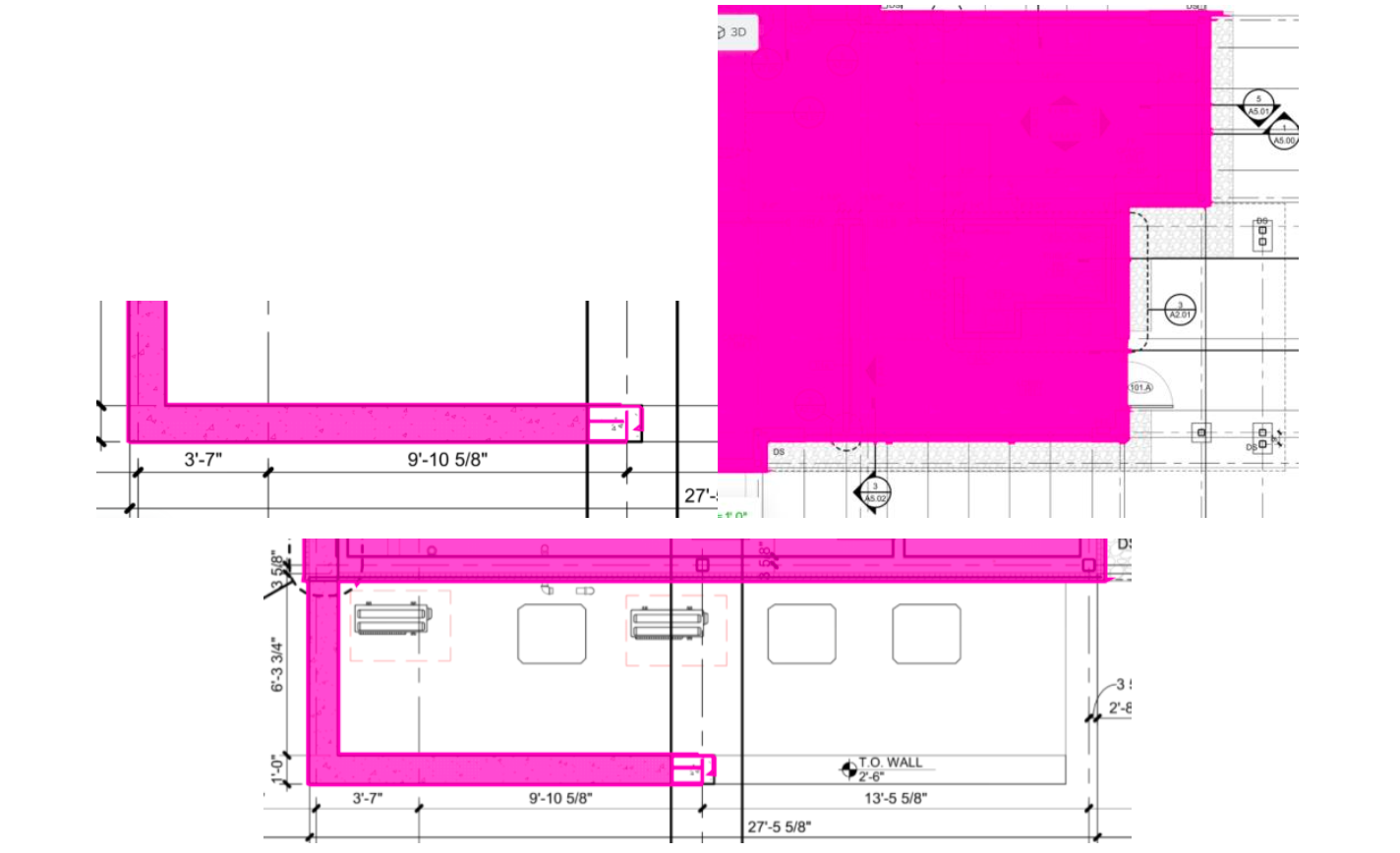
Inconsistency when recognizing and tracing one of the trench drains in the area quantities (net area and wall perimeter, and center line).
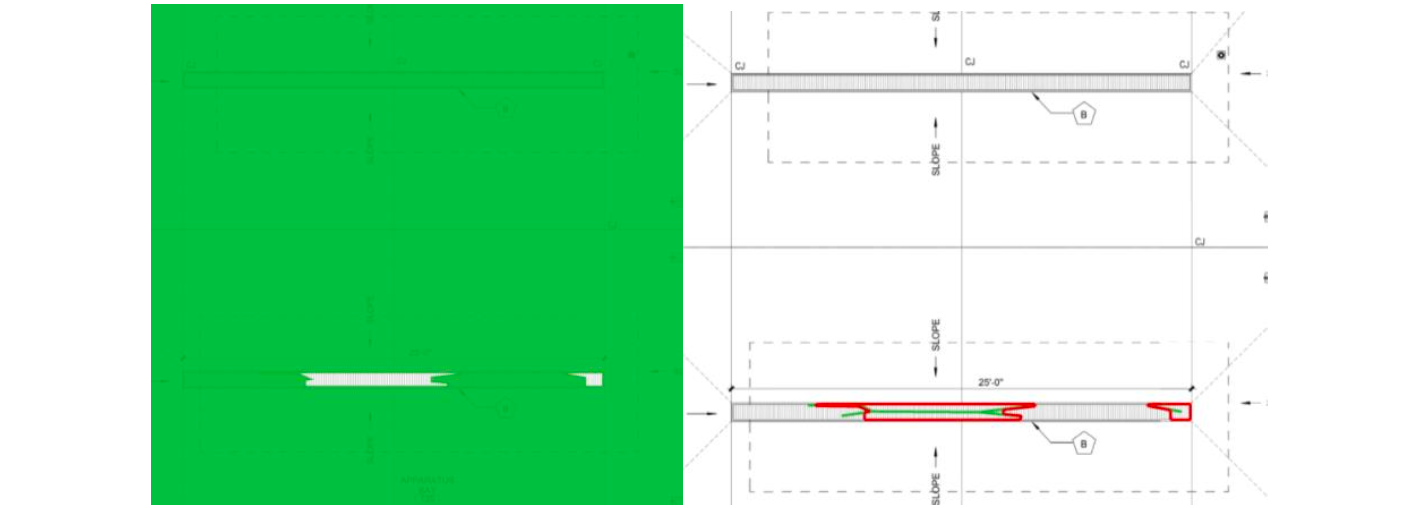
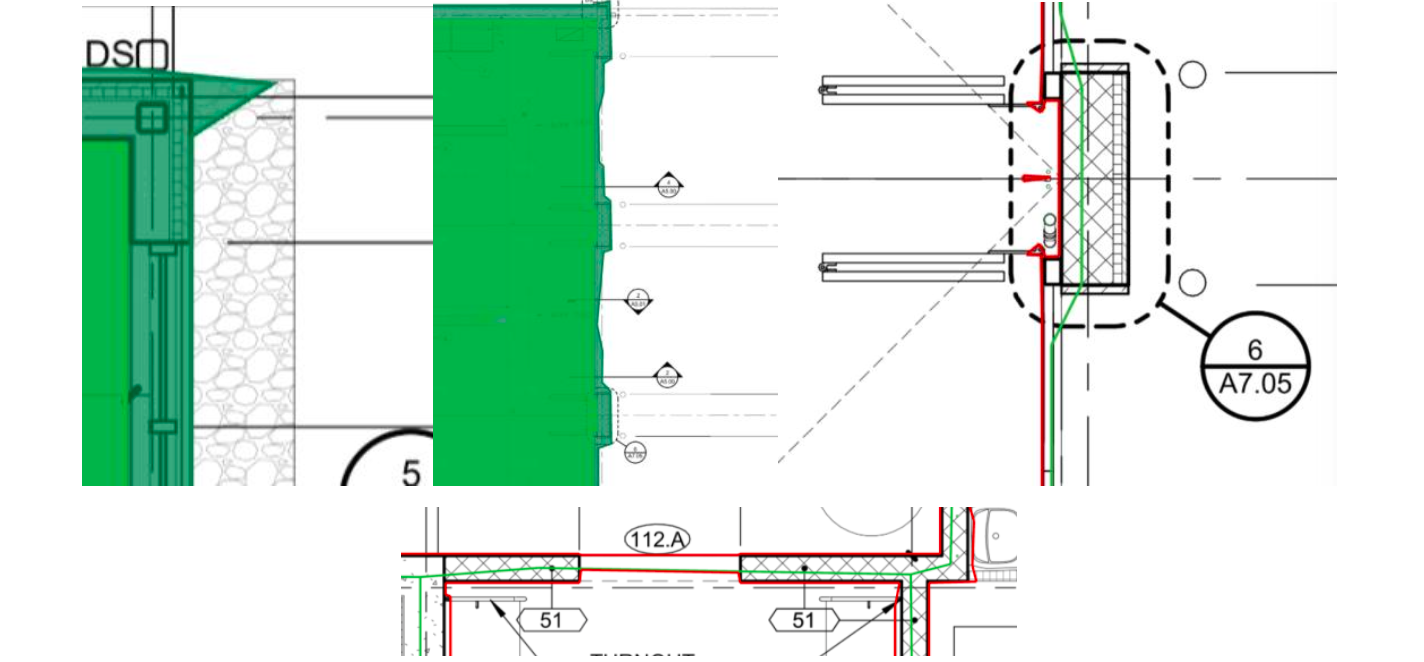
Irregularities with area borders for net area and footprint values. Non-uniform with drawings.
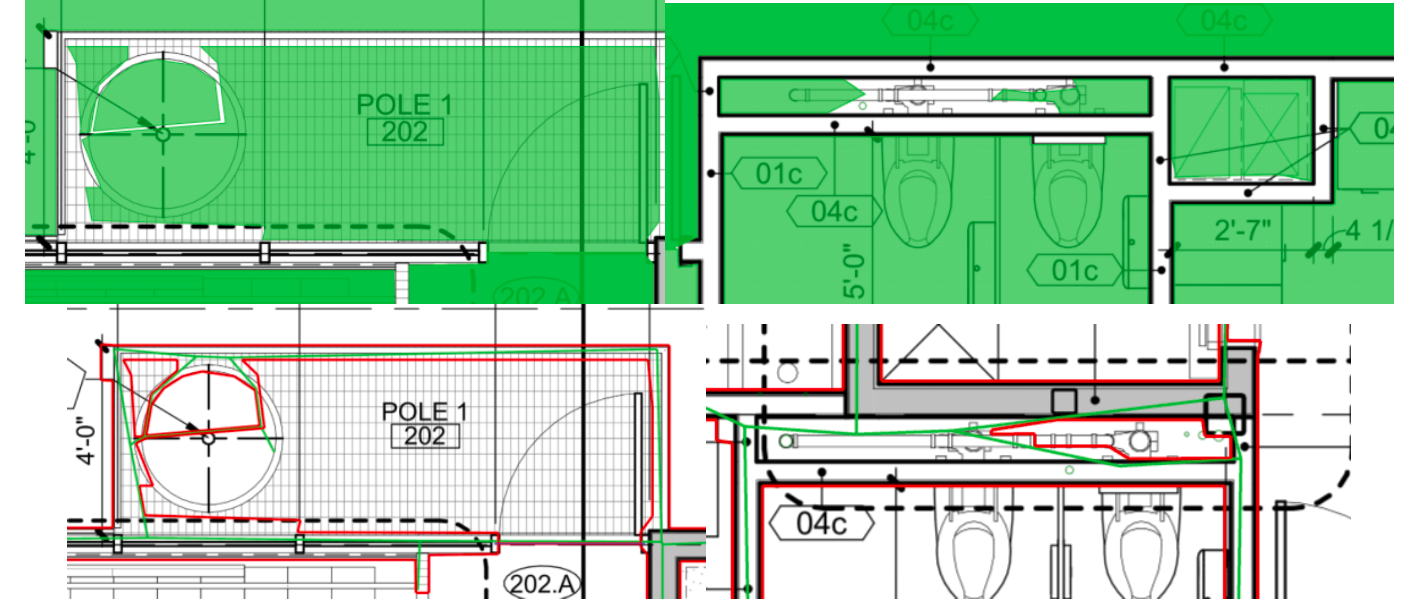
Errors in tracing and identifying empty spaces, in which plumbing and mechanical installations are located.
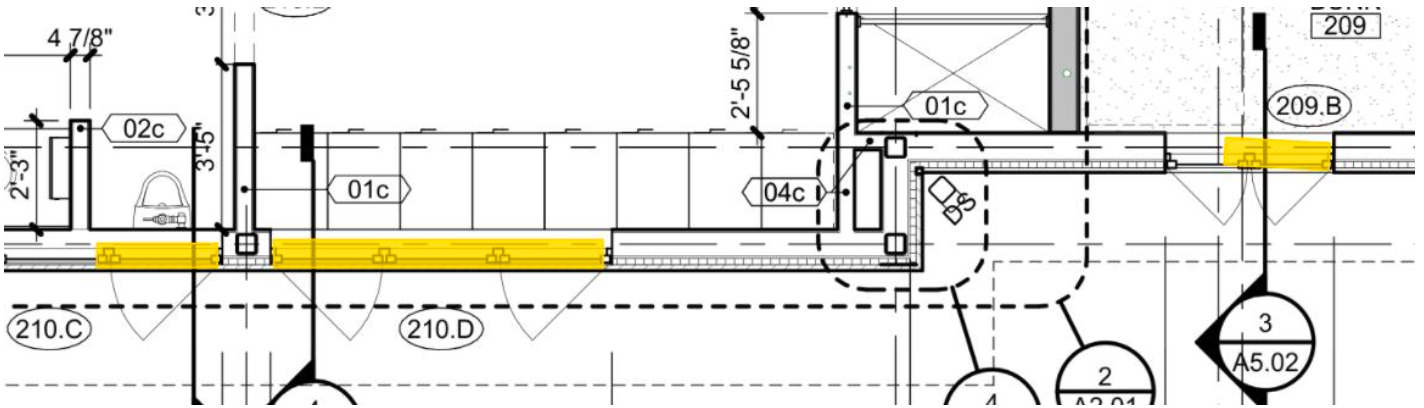
Inconsistencies in count quantities: separating doors from windows.
2. Case Study II: Multistory Hotel
a. Floorplan A1.01: Individual Quantity takeoffs
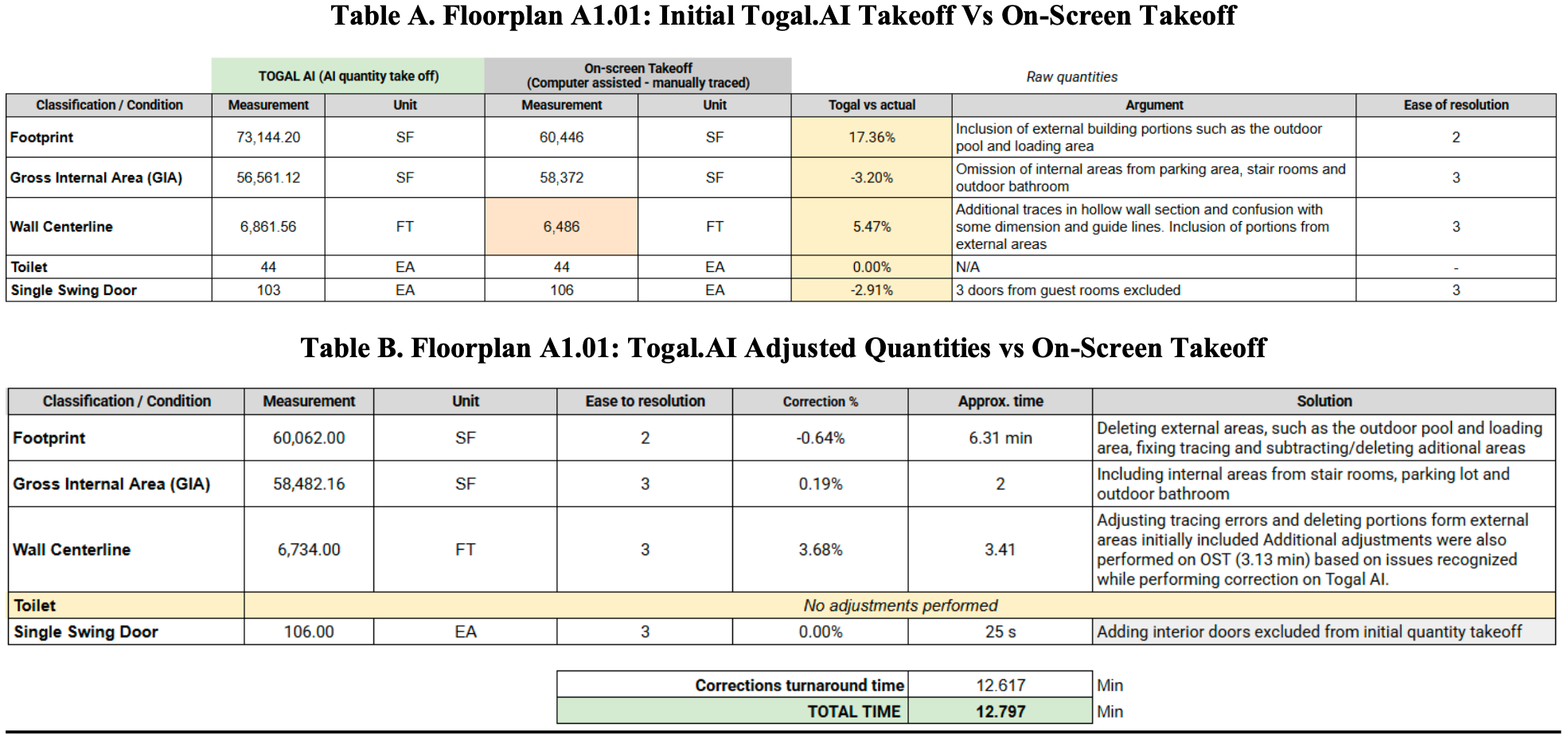
Table B. Floorplan A1.01: Togal.AI Adjusted Quantities vs On-Screen Takeoff
Key Inconsistencies of the AI-automated Quantity Takeoff
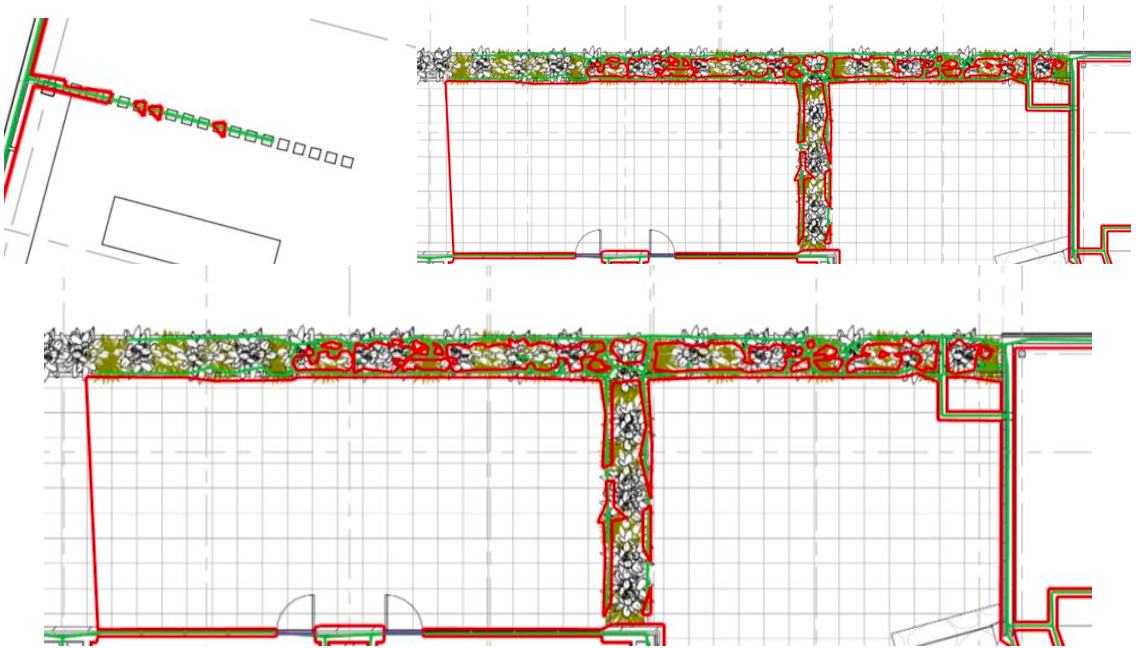
Overall, linear quantities (wall perimeter and wall center line) appear to be right. However, the following were identified during the adjustment process for Togal.AI.
A portion of the outdoor pool was included in the wall perimeter quantity and area classifications.
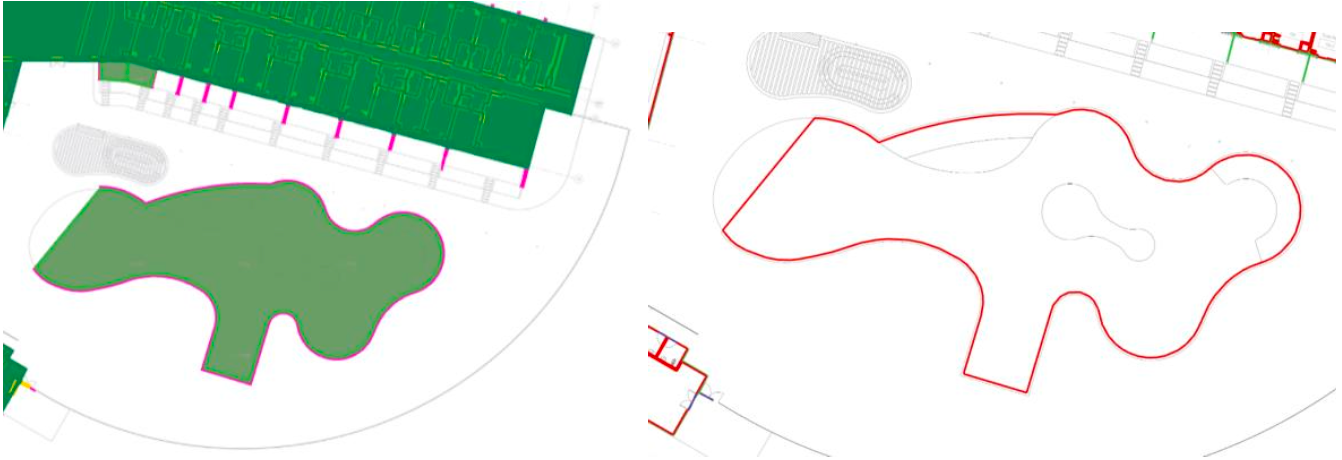
AI assumed different items in the floor plans as wall sections (such as the planter, garden, and exterior steps). Additionally, portions of hollow spaces were included in linear quantities.

Additional Comments: Comparison Between On-Screen Takeoff and Toga AI.
On On-screen takeoff it was difficult to trace diagonal areas, even with individual adjustments and corners. Tracing was performed to achieve accuracy and speed, but portions of the parking/loading area were included.
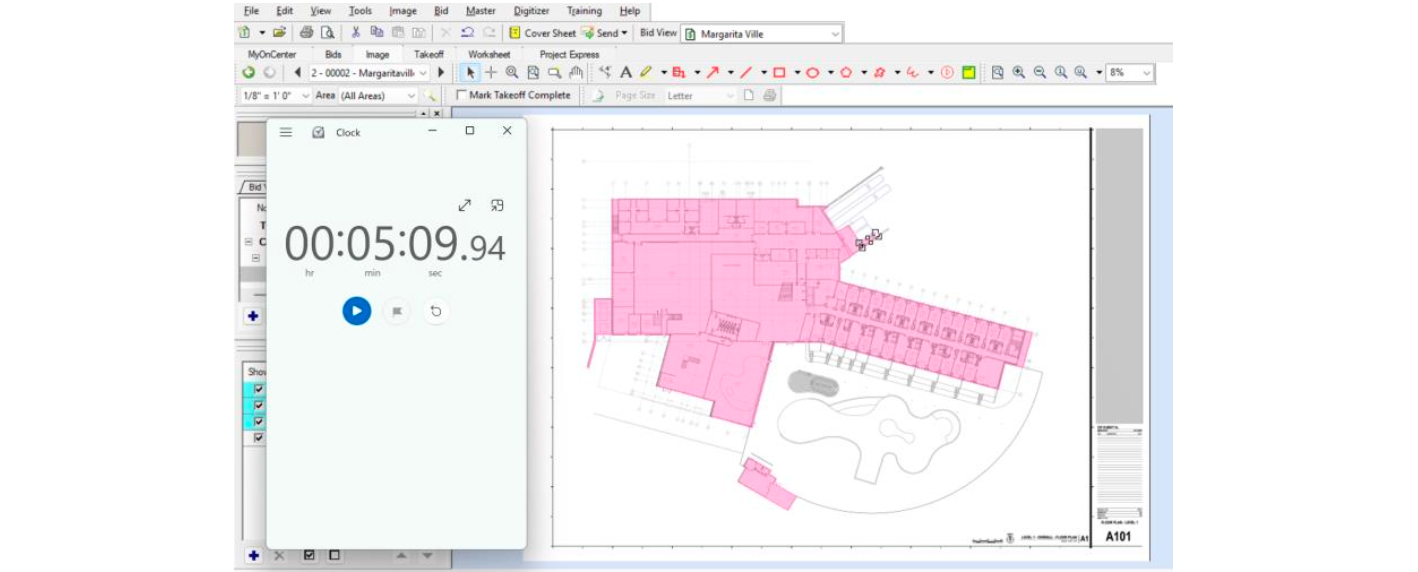

Adjustments were also performed in the OST quantity takeoff based on issues identified while performing corrections on Togal AI.

.jpg)


.png)